
The AI workshop that adapts to your child.
From 8 to 14, your child creates real projects — a game, a story, a quiz, a brand page — with an AI coach that helps without doing the work for them. A session lasts 20 to 25 minutes. Every week, you see what they did and what they learned.
Teylio is currently available by invitation or after approval. The parent holds the account; no information about the child is requested.
A workshop, not a chatbot.
Teylio is an online workshop. A child aged 8 to 14 builds concrete projects there, with the help of an AI. Each project is a mission cut into short steps. The child decides, writes, tests and signs. The AI coach asks questions, gives hints and lays things out.
For children aged 8 to 14
Three levels — Junior, Creator, Advanced — so the workshop speaks to an 8-year-old as well as a 14-year-old.
For parents who want to see
A parent space and a weekly report: what the child did, what they learned, the next step.
In French, English and Hebrew
The workshop, the parent space and the reports exist in all three languages, right-to-left in Hebrew.
Your child creates real projects with AI, instead of simply chatting with it.
A chatbot answers questions. Teylio gets things made. At the end of a mission there is a finished, signed object the child can show and explain.
Teylio adapts to the child, not the other way round.
The child's age, pace, language and interests guide the missions. Three levels change the tone and the length of the steps. The rules never change.
Junior
Very short steps, one instruction at a time, simple words and plenty of encouragement.
Creator
A brief, a first render, precise feedback, a version 2: a creator's full cycle.
Advanced
Reasoned choices, a detailed signature and a critical eye on what the AI proposes.
A mission, short steps, one thing at a time.
Each mission is cut into short steps. A first version exists quickly, then it gets better. At the end, the child signs.
An idea
The child writes their first idea, alone.
A brief
For whom, what, which mood: three lines.
A first version, fast
The coach lays it out. The child sees their project exist within minutes.
Feedback, a version 2
The child says precisely what is wrong. The render changes.
Signature
"What I did myself" and "what the AI did", written by the child. Then wrap-up.
A coach that helps without doing the work.
The coach asks questions, gives graded hints and lays things out. It does not write the story, choose the idea or fill in the brief for the child.
What the child does themselves
The split is explicit, and the child signs it on every creation.
The child
- Writes the idea
- Fills in the brief
- Gives precise feedback
- Decides what to keep
- Signs their part
The AI coach
- Asks questions
- Gives graded hints
- Lays things out
- Renders a first version within minutes
- Makes visible what it did
What it looks like
Screens from the real product, with demo data and fictional nicknames.
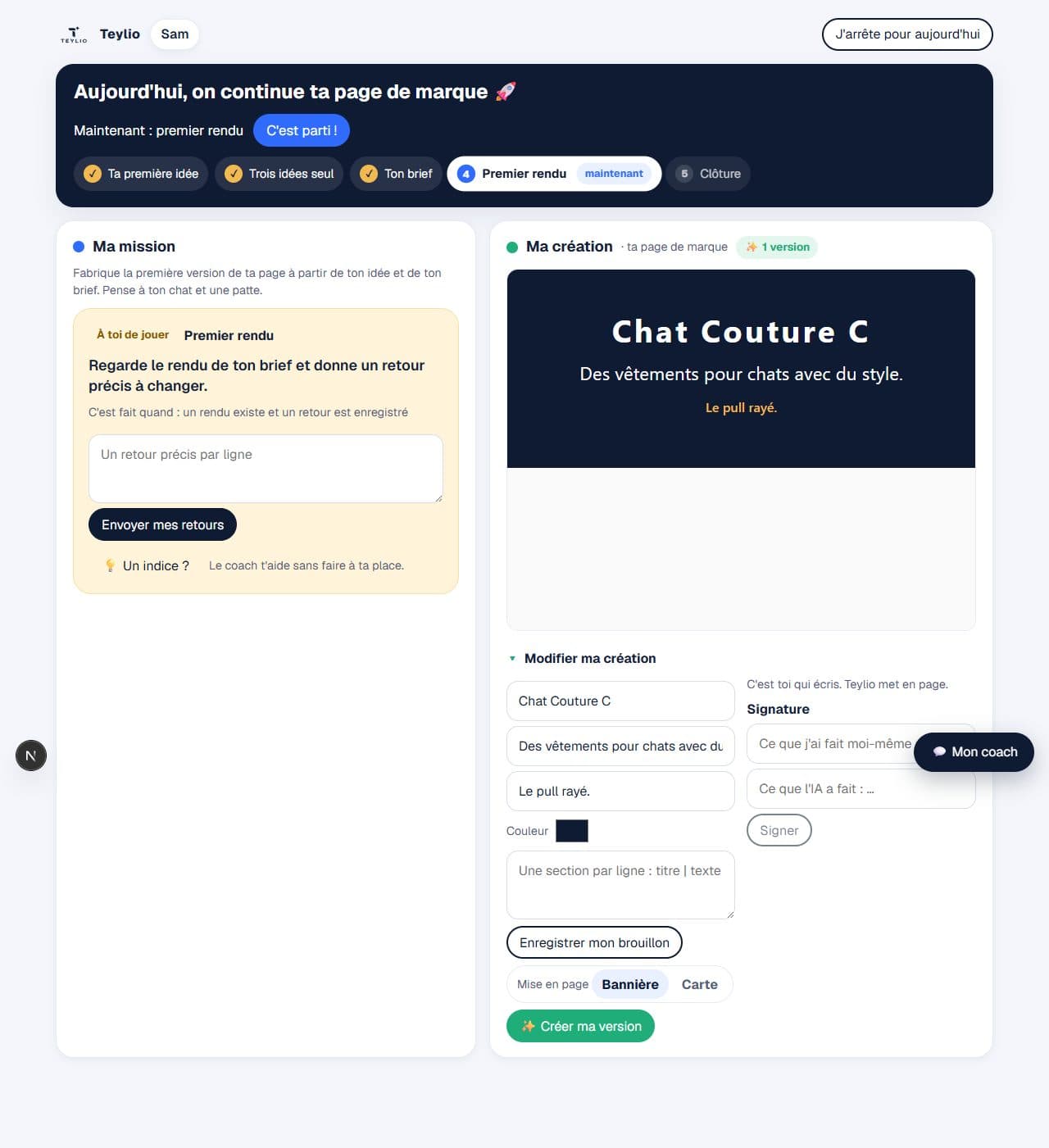
A parent space, and a weekly check-in.
You hold the account. You add your child with a nickname and a code — never their full name, never an e-mail for them. You set how long sessions last and which topics to avoid.
- What they did, what they learnedOne board per child, with dated proofs. Never an interpretation.
- The weekly reportEvery week: what the child did, what they learned, the next step, and a question to ask them.
- Your settingsMaximum session length, sessions per week, topics to avoid or favour.
- TransparencyYou can read every session word for word for 90 days. After that, the text is deleted.


Safety and privacy, by design.
Children's data is never sold, never used for advertising, never used to train a model.
No advertising, no commercial profiling, no resale, no model training with children's data, neither by us nor by our subprocessors.
The parent holds the account
The child never has their own login or e-mail: a nickname and a code, that's all.
No engagement design
No streaks, no notifications to the child, no purchase on the child's side.
Data hosted in the European Union
Before a message reaches the AI, anything that could identify the child is removed. The AI only knows the nickname.
An AI that says so
The coach always says it is an AI and is never a friend.
By invitation or after approval.
Teylio is currently available by invitation or after approval. You request access, we approve, you receive an e-mail. Nothing is created automatically. The workshop then opens in a web page, on a computer or a tablet: there is nothing to install.
Already authorised? Sign in with your parent account.